HostLens
EN

Server IP, CDN and tech stack on every site you open.

HostLens sticks a small label in the corner of the page you are looking at: the IP of the server you reached, the CDN in front of it and — if you switch it on — what the site is built with. Everything comes from the response Chrome already received: no extra requests, no account, no tracking.

Coming soon to the Chrome Web Store The listing is under review. This page will link to it the day it goes live.
See what the label says ↓

Hover the badge in the corner: it moves out of the way. Hold Ctrl and it stays; Ctrl + click copies the IP.

What the label says

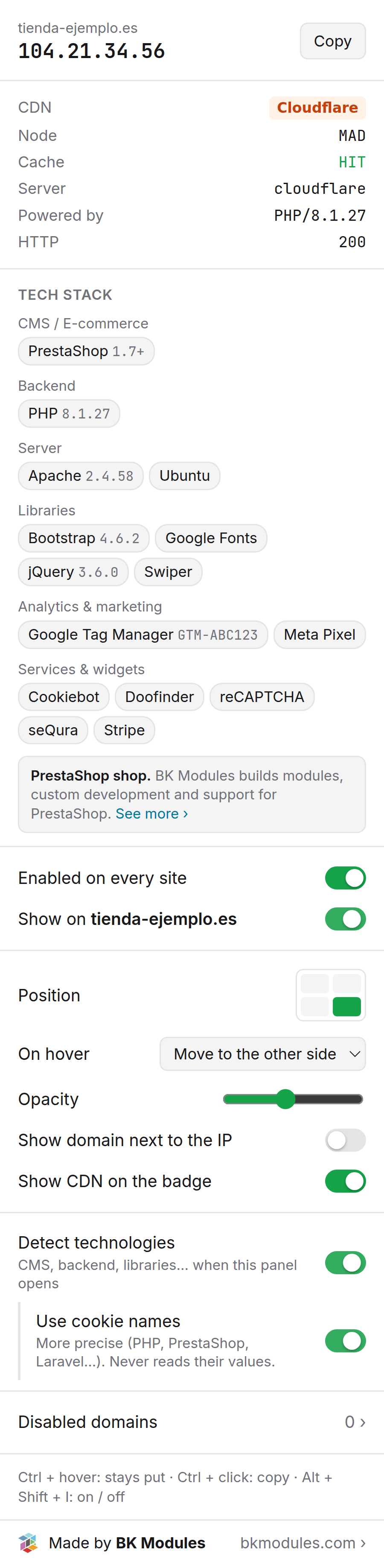
Click the toolbar icon and the whole panel opens. These are real crops of it: three units, one fact each.

The server, and who stands in front of it

The IP, with a copy button
The server Chrome connected to for this tab. If the response came from cache, it says so right there.
CDN, edge node and cache status
Recognised from the response headers: the node that served the page (MAD, CDG, FRA) and whether it came from cache — HIT, MISS, DYNAMIC.
Server, X-Powered-By and HTTP
What the server says about itself and the response code. Same response, zero cost.

The stack, if you turn it on

By category, with versions
CMS and e-commerce, backend, web server, frontend, libraries, analytics and services. Versions appear when the site exposes them.
Every chip says where it came from
Headers, page, resources or cookie name. Inferred items get a dashed border so you never mistake them for evidence.
Off by default
Turning it on asks Chrome for the permission, which is removed the moment you turn it off. Cookie values are never read.

Where it sits and how it dodges

On every site, or just this one
A global switch and one per domain. Disabled domains have a searchable manager; paste whole lists if you like.
Corner, dodge, opacity
Which corner, where it jumps on hover (other side, up and down, diagonal or not at all), how transparent, and whether it shows the domain and the CDN.
One shortcut
Alt + Shift + I turns it on and off everywhere at once.

No cable goes out

Not a slogan — the wiring. HostLens has no server and makes no requests: it reads the response Chrome already received from the page.

No network requests
The IP and headers come from loading the page itself. No DNS lookups, no geolocation, no third-party services: nobody learns which sites you look at.
No account, no analytics
No sign-up, no usage statistics, no telemetry inside the extension.
Permissions only when needed
Reading the page and cookie names only if you enable tech detection, and they are dropped when you turn it off.
DataPurposeWhere it livesHow long
IP and headers of each tab's main page IP, CDN, node, cache, server Chrome storage.session, in your browser Until you close the tab
Your settings and the disabled-domain list Remember your configuration Your Chrome profile (storage.sync / local) Until you uninstall
Public page markers (meta generator, script URLs, globals) Detect technologies, if enabled Not stored — read when the panel opens While the panel is open
Cookie names of the site (never their values) Refine PHP, PrestaShop, Laravel…, if enabled Not stored While the panel is open

Full privacy policy →

Fifteen CDNs, recognised by their headers

Behind a CDN the badge shows the IP you actually reached — the edge — and tags it, so you never mistake Cloudflare for your origin.

  • Cloudflare
  • Amazon CloudFront
  • Fastly
  • Akamai
  • Vercel
  • Netlify
  • Bunny CDN
  • Azure Front Door
  • Google
  • Sucuri
  • Imperva
  • KeyCDN
  • CDN77
  • Hostinger CDN
  • Fly.io
  • edge nodeMAD
  • cache statusHIT

What we use it for

We built it for the daily work of a PrestaShop agency and publish it exactly as we use it.

  • Migrations

    Confirm a domain already resolves to the new server, on every site and every tab, without ping or dig.

  • Cloudflare and CDNs

    See whether a shop goes through Cloudflare, which edge serves it and whether the page came from cache. HIT/MISS explains a lot of “it feels slow”.

  • Quick audits

    Which PrestaShop, PHP and jQuery versions, which payment gateway and which analytics a shop runs, before quoting anything.

  • Support

    When a client writes “the site is slow”, the first question — which server, what is in front of it — is answered the moment you open it.

Questions we get asked

Why do I see a Cloudflare IP instead of my server's?

Because the CDN is in front: Chrome connects to Cloudflare, not to your server, and that is the only IP that exists from outside. The CF tag tells you so. Not even Chrome sees the origin IP.

What does the yellow dot mean?

The page was served from Chrome's cache, with no new connection. The IP shown is the one from the last real connection to that site.

Does it work with IPv6?

Yes. It shows whichever address Chrome used, v4 or v6, and the domain manager accepts bracketed IPv6 addresses.

Why does it ask to “read and change all your data on all websites”?

That is Chrome's standard warning for any extension that works on every site: the badge has to appear without a click, and seeing the IP means observing the response. It changes nothing on any page beyond adding the badge, and you can restrict it to chosen sites from chrome://extensions.

Does it slow down browsing?

No. It makes no requests and runs no analysis on page load; tech detection only runs when you open the panel.

Which languages does it come in?

The extension follows Chrome's language: English and Spanish. This site is in English, Spanish, French, German, Italian and Portuguese.

Coming soon to the Chrome Web Store

Plug it in

HostLens is free and will stay free. Made by the team that keeps PrestaShop shops running: modules, custom development, ERP integrations and someone who answers when something breaks.

PrestaShop shop? Talk to BK Modules →